Showing posts with label Google Sites. Show all posts

Friday, 26 July 2019

Digital Fluency Intensive #6

Manaiakalani: Connected
The default is visibility. Manaiakalani connects students across the cluster for valuable sharing and connecting for learning. We are also connected to a number of clusters around the country as part of the Manaiakalani Outreach. This allows for teacher support and a shared language as well.

Connected learners share (Tohatoha). What a great reminder that we are all connected through the Manaiakalani site to our own school sites, which enables students (and teachers) to see what is happening at other schools. 

Implementing the kaupapa of Manaiakalani all four elements are required to be working together at all times in order for the effectiveness to be seen across the classrooms. 


Looking at the visual appeal for sites and 2-3 clicks. What is good and what needs improving? We spent time looking at sites from around the clusters and evaluating them. 


By using Google Sites (instead of other available platforms) students have access to their learning and resources at any time, whether at home or school.  When creating a site, you always need to consider who your learners are, how they are accessing the site, what the theme of your site is going to be and what the purpose of the site is.
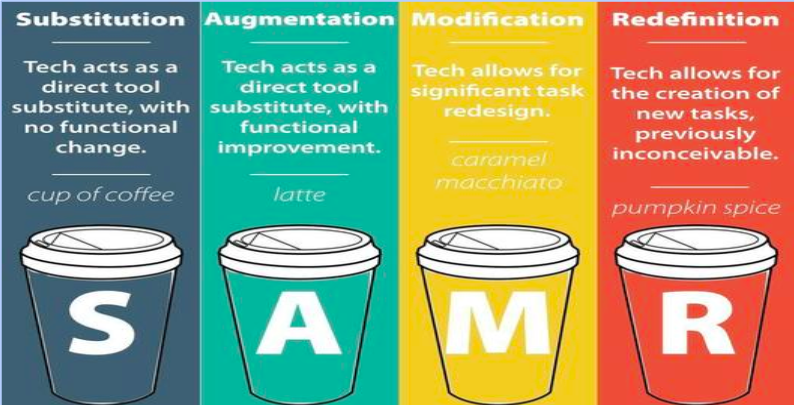

No matter what you are creating for students, it is important to make them purposeful learning tasks. don’t forget to keep the SAMR model in mind.  When modifying and redefining, it is important to remember that you are using multiple platforms to learn, create and share their learning. Just as it is important to spend time reflecting on the technology affordances you are providing for your learners.


One of the things that I spent some time doing today was cleaning up our team site a bit. We tend to randomly add links to our site as we need them (for testing purposes, media links, etc). I went through and made these links more uniform to the rest of the site format by creating actual buttons. Some of these can be seen on the bottom of the home page for our class site.

Taking time in the future to have students create a site for a specific reason is something that I am considering and the reminders we were given today about the site building are a great place to start when working with students as well. A big thanks to Clarelle Carruthers for all her helpful tips, especially those in regards to choosing a colour scheme, font(s), and layout to use throughout the site development.


Friday, 28 June 2019

Digital Fluency Intensive #5

What did I learn that increased my understanding of Manaiakalani kaupapa and pedagogy?

Manaiakalani: Visible Teaching and Learning

It is easy for us to overthink the word “visible”. However, it has been around since the beginning of time. 

Previously, the teaching/learning journey was invisible. It was very difficult to see what it was that students were learning at a particular time. Many students learnt how to read the teacher’s mind and figure out what was expected of them. This often comes from family involvement and discussions that occur in the household.

However, it is now the way in Manaiakalani classroom for teaching and learning to be visible to enable all students to be successful. In all aspects of classroom interaction (from planning, process, outcomes and assessment) what can be visible?  We want to be sure that there are no surprises in our classroom for our students. Teaching should be accessible, available and advanced.

Using Multi Modal Learning
As educators, our job is to make learning engaging, and exciting for our students. We, in Manaiakalani, need to always remember our Hook. Is what we are doing in class engaging? Will it “hook” them into the learning that I want them to experience? We need to be working to inspire our kids to go in and investigate further. 

What did I learn that could improve my confidence, capability or workflow as a professional?
 
General Rules of Thumb: (and great reminders!)
Always, plan your site first on paper. Make sure you set up a folder in your drive with the permission settings set to anyone with the link can view. 

Students should be able to access what they need within THREE clicks. 

Headers: Use a Banner (w/ Image) or Title Only.

When creating buttons using Google Drawing, it will always open a new tab which does not allow students to "go back". 

Embedding Twitter Feeds: Go to publish.twitter.com put in the twitter feed account URL that you want to use and then select that you would like it as a timeline. Once you get the embed code, add it to your site and it will naturally populate in real time. 


What did I learn that could be used with my learners?  
As part of our afternoon, I spent time working with Robyn Anderson and Sarah Tuia to create a mutli-modal Google Site using the mulit-textual database that I helped to create as part of my 2017 Spark Manaiakalani Innovative Teacher inquiry. We spent time looking at Maori myths/legends and working our students through the historical art of oral story telling. A link to our site can be found here. I would love to use this site with my students in the future and consider putting together multi-modal site pages together for students to use in the future, especially for topics covered every year (ie Matariki, Pt England Way, etc).