Showing posts with label Digital Fluency Intensive. Show all posts

Friday, 16 August 2019

Digital Fluency Intensive #9

Today was our final Digital Fluency Intensive, and while I am excited to get back to being in my classroom on Fridays, I am going to miss learning new things each week. I always find it beneficial to spend time with my colleagues discussing our kaupapa and learning new things from one another.  Hopefully, in the future, there will be more opportunities for me to participate in other PLGs such as this and possibly help out with future DFI cohorts.

Manaiakalani: Ubiquitous Learning
Anytime. Anywhere. Any pace. From Anyone. Ubiquitous learning makes learning different from the way it “used to be”. Learning is no longer constrained by time, place, people or pace. Children today no longer needs to take place only in school.  This is so amazing for the learning of our students who generally are exposed to 30,000,000 less words than students living in higher decile areas. The summer learning journey has proven that our students are supported ubiquitously through technology and they have made exceptional growth in their learning in many areas.

If we as teachers, make a practice of rewindable learning and make sure that they are available digitally, then we are ensuring that all of our students have the tools they need to be successful. The students who need to see something more than once will potentially allow them greater understanding.

If it’s worth Teaching, it’s worth capturing.  
If it’s worth Learning, it’s worth capturing.

Google Classroom
It was great to get a quick crash course on Google Classroom before we began our Level 1 Certification Exams. It was extremely helpful considering this is a Google App for Education that we do not use in Manaiakalani as it does not directly follow our kaupapa.

Current classes will be shown, but to create a new classroom use the plus (+) button and you can join or create a class. Create class box comes us (Name, subject, Room Number, etc)  The front page for the class becomes like a message stream showing all communication in a feed. Classwork: create assignment, quiz, question, etc and then you can attach the task from your drive. google calendar will take you out to the calendar.  To add a student, click on People. To directly add: start typing the student’s name and they will appear Google Style to add them into the database.  To have a whole class log in, the teacher can send out a code to their class.

Google Level 1 Certification

Phew!  My hands were sweaty as I pressed submit, but I finished the exam with relative ease in just about 2 hours.  However, I took another 20 minutes to review my questions, and it paid off!  It's nice to know that hard work does pay off. So thankful for the opportunity to be part of the 2019 Auckland DFI Cohort #2, and I look forward to working towards my Level 2 certification.


Friday, 26 July 2019

Digital Fluency Intensive #6

Manaiakalani: Connected
The default is visibility. Manaiakalani connects students across the cluster for valuable sharing and connecting for learning. We are also connected to a number of clusters around the country as part of the Manaiakalani Outreach. This allows for teacher support and a shared language as well.

Connected learners share (Tohatoha). What a great reminder that we are all connected through the Manaiakalani site to our own school sites, which enables students (and teachers) to see what is happening at other schools. 

Implementing the kaupapa of Manaiakalani all four elements are required to be working together at all times in order for the effectiveness to be seen across the classrooms. 


Looking at the visual appeal for sites and 2-3 clicks. What is good and what needs improving? We spent time looking at sites from around the clusters and evaluating them. 


By using Google Sites (instead of other available platforms) students have access to their learning and resources at any time, whether at home or school.  When creating a site, you always need to consider who your learners are, how they are accessing the site, what the theme of your site is going to be and what the purpose of the site is.


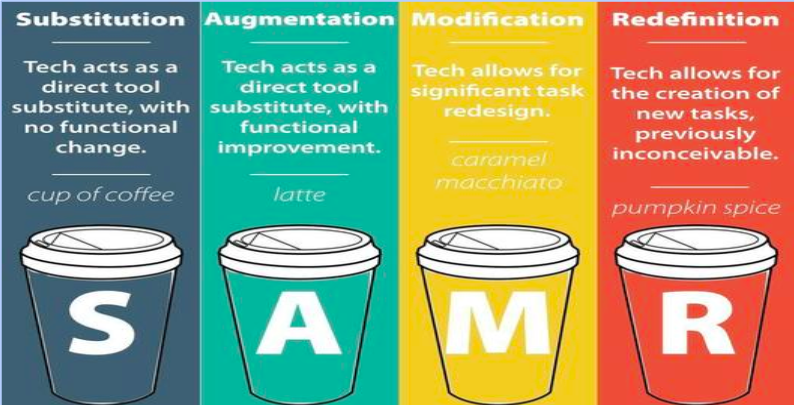
No matter what you are creating for students, it is important to make them purposeful learning tasks. don’t forget to keep the SAMR model in mind.  When modifying and redefining, it is important to remember that you are using multiple platforms to learn, create and share their learning. Just as it is important to spend time reflecting on the technology affordances you are providing for your learners.


One of the things that I spent some time doing today was cleaning up our team site a bit. We tend to randomly add links to our site as we need them (for testing purposes, media links, etc). I went through and made these links more uniform to the rest of the site format by creating actual buttons. Some of these can be seen on the bottom of the home page for our class site.

Taking time in the future to have students create a site for a specific reason is something that I am considering and the reminders we were given today about the site building are a great place to start when working with students as well. A big thanks to Clarelle Carruthers for all her helpful tips, especially those in regards to choosing a colour scheme, font(s), and layout to use throughout the site development.


Friday, 28 June 2019

Digital Fluency Intensive #5

What did I learn that increased my understanding of Manaiakalani kaupapa and pedagogy?

Manaiakalani: Visible Teaching and Learning

It is easy for us to overthink the word “visible”. However, it has been around since the beginning of time. 

Previously, the teaching/learning journey was invisible. It was very difficult to see what it was that students were learning at a particular time. Many students learnt how to read the teacher’s mind and figure out what was expected of them. This often comes from family involvement and discussions that occur in the household.

However, it is now the way in Manaiakalani classroom for teaching and learning to be visible to enable all students to be successful. In all aspects of classroom interaction (from planning, process, outcomes and assessment) what can be visible?  We want to be sure that there are no surprises in our classroom for our students. Teaching should be accessible, available and advanced.

Using Multi Modal Learning
As educators, our job is to make learning engaging, and exciting for our students. We, in Manaiakalani, need to always remember our Hook. Is what we are doing in class engaging? Will it “hook” them into the learning that I want them to experience? We need to be working to inspire our kids to go in and investigate further. 

What did I learn that could improve my confidence, capability or workflow as a professional?
 
General Rules of Thumb: (and great reminders!)
Always, plan your site first on paper. Make sure you set up a folder in your drive with the permission settings set to anyone with the link can view. 

Students should be able to access what they need within THREE clicks. 

Headers: Use a Banner (w/ Image) or Title Only.

When creating buttons using Google Drawing, it will always open a new tab which does not allow students to "go back". 

Embedding Twitter Feeds: Go to publish.twitter.com put in the twitter feed account URL that you want to use and then select that you would like it as a timeline. Once you get the embed code, add it to your site and it will naturally populate in real time. 


What did I learn that could be used with my learners?  
As part of our afternoon, I spent time working with Robyn Anderson and Sarah Tuia to create a mutli-modal Google Site using the mulit-textual database that I helped to create as part of my 2017 Spark Manaiakalani Innovative Teacher inquiry. We spent time looking at Maori myths/legends and working our students through the historical art of oral story telling. A link to our site can be found here. I would love to use this site with my students in the future and consider putting together multi-modal site pages together for students to use in the future, especially for topics covered every year (ie Matariki, Pt England Way, etc).


Friday, 21 June 2019

Digital Fluency Intensive #4

What did I learn that increased my understanding of Manaiakalani kaupapa and pedagogy?

Share:
We have been sharing as humans since time began. While the mode of sharing is ever changing, the actual human response remains the same. However, digital affordances have changed the speed and amplification of the information being shared. Since 2005, the original 7 Manaiakalani schools have focused on harnessing the digital affordances to find the best way to use the latest technologies to help our students learn most effectively.

Why do we (still) use Blogger: Used as a space where we can teach our students many things at one time when focusing on what it looks like to be an effective digital citizen while online. As a school, we have many systems in place that allow us to legally monitor student (and general population) engagement with the digital tool. The importance of blogging three times a week was also revisited as it has proven once again (by the Woolf Fisher Research Centre) that students who blog three times a week continue to show academic growth even during non-teacher contact time.

Manaiakalani is the only cluster of schools in NZ that has a dedicated Cybersmart Curriculum. We know that our students are taught a dedicated Cybersmart Curriculum.  

What did I learn that could improve my confidence, capability or workflow as a professional?


Google Forms:

We had a few good reminders before sending out a form. Using the settings, make sure you check:

-Do you want email addresses?
-Responses to form emailed to participants
-Checking/Unchecking external domain access
-Limit to 1 response (or not)
-Editing after submission
-See other’s responses

Perhaps the most mind blowing suggestion for me is using one spreadsheet to collate data for many forms. I hadn't realised that you could do this previously. It would be so beneficial to have all the data collected using forms for one school year on the same spreadsheet.
-Select Response Destination
-Select Existing Spreadsheet
-Rename the tabs to reflect the correct form

Sheets:
Sparkline: Making individual line graphs for a row of data that shows in a cell. (=Sparkline).

We also learnt how to program a Macro to record a set of directions that are used often. Those directions are programmed into a recorded list and then can be applied with the stroke of a few keys to update a new spreadsheet (or tab) in the same way.


What did I learn that could be used with my learners?  

My Maps:
Used to track/plan journeys, measure distances, add place markers
Importing from a Spreadsheet:
-You are able to have students add data into a Google form and then import that information from the spreadsheet onto the MyMap place markers. 
-Creating various layers using the same map
-Students can embed their individual MyMap to their blog


I would love to have my students trial the Blog Post Analysis as I discussed on my post here.

DFI: Blog Analysis

As part of the DFI Session 4 (Dealing with Data), we spent the day exploring ways that we could better collect, collate and display data. At the end of the day, we talked a bit about how our students in Manaiakalani (and across the Outreach Clusters) make accelerated growth in their learning when they blog post a minimum of three times a week and continue their growth over the holiday periods if they continue blogging on their own.

We looked into a statistical investigation that Robyn Anderson (Panmure Bridge School) did with her Year 7/8 students looking into the regularity of their own blog posting.  We were then tasked to use the tools we explored during the day today to look deeper into some student blogs from around Maniakalani and analyse them. After doing so, I spent some time looking at my own professional blog and this is a DLO for what I came up with.


This is a task that I would love to do with my students in the near future to see how they think they measure up with the 3 posts a week average goal, and what goals they would set for themselves moving into term 3.

Friday, 14 June 2019

Digital Fluency Intensive #3

What did I learn that could improve my confidence, capability or workflow as a professional?

Image result for DJI Spark logoToday began with Kent Sommerville talking with us about using drones and other camera connections to livestream using YouTube. He not only shared with us the various uses of drones in a school setting but also how to set up your livestream to be delayed or immediate for various reasons.  We also spent some time discussing the pros and cons of using a GoPro verses a Drone for various reasons. 

I love being part of a school that has the latest digital affordances available that will provide students with different cutting edge experiences. My mind is already working though how I may use the Drone or Osmo when filming my film festival movie.

 Just before morning tea, we also spent some time exploring YouTube a little further. We looked into how to set up a YouTube channel that could be used to put together playlists of videos for our students to use for rewindable learning or for deeper learning into a subject.

What did I learn that increased my understanding of Manaiakalani kaupapa and pedagogy?
Manaiakalani Pedagogy Focus: Create/Hanga
As always, it is so wonderful to have some time to focus in on the Learn, Create, Share pedagogy of Manaiakalani. Today we focused on Create/Hanga.

Create in Manaiakalani is all about the hook. What can you do to “hook” students in learning?

“Creative skills help students become better problem solvers, communicators and collaborators.” (Everyone Can Create Apple)
“Creativity focuses on the process of forming original ideas through exploration and discovery. In children…” (Kohl 2008)

Create has to continue from ECE classrooms all the way through to Year 13. 
NZ was formerly known around the world as a centre for creative education. The documentary called The heART of the Matter focuses on NZ education 60 years ago in the far north at a school which is now a Manaiakalani Outreach School.  
It is important to remember that Create is a DOING word, using the whole body and incorporates the senses.  The idea of doing something allows our minds to be kickstarted into doing something. 

What did I learn that could be used with my learners?  


After hearing a bit about how to use Google Drawing, we had some lovely students come in from Panmure Bridge School and my Blog Post is Here from our session with them.

My big take away from that session is using Shift when resizing the canvas to your desired size.


We also spent some time looking at Google Slides and we were asked to use it to Create something that we would like to use with our students. After exploring student blogs last week for our Hangout assignment, I really wanted to have a go at making an interactive game using Slides. I am so excited to use it next week with my maths students. Check out my blog post here to see my creation.


Gaming with Slides

Today, while at DFI Session 3, I was given some time to Create using some of the tools that we explored today that we plan on using in class next week. I decided as part of our Maths Follow Up Tasks, my students would have the opportunity to create a game using a mathematical concept.   Here is the slide deck for the game that I created:


When students play the game, it would present like this:


I am really excited to teach this way to Create during my Maths classes this week, and I already have ideas for using it with Literacy as well.

Google Drawing a Picture

As part of our DFI session this week, we had some lovely students from Panmure Bridge come by to share with use some Drawings they had made using Google Drawings. We then had some time to explore doing this using the Polyline drawing tool.

Here is a picture of a Kiwi Bird made using Māori designs that I drew during our session.

Friday, 7 June 2019

Digital Fluency Intensive Session 2


What did I learn that increased my understanding of Manaiakalani kaupapa and pedagogy?


It was a great morning spending some time reviewing the Learn/Ako focus of our Manaiakalani pedagogy. It was a great chance to refresh some of the information that was shared with us during our term 1 staff meeting.

A few take homes for me were:
FOCUS: effective teaching and learning using both digital and analog world (side by side railway tracks)
-Effective Practice is teaching that RATs:
Recognise Amplify Turbocharge
-Learn is not prescribed by Manaiakalani...it differs from school to school and has nothing to do with digital education
-Great teaching + Digital Affordances=Accelerated Learning


What did I learn that could improve my confidence, capability or workflow as a professional?

One tab would be an amazing extension to help organise my life professionally. I often leave Professional meetings (COL, DFI, etc) with many tabs open that I want to use to formulate an informative or reflective blog post at a later date.  I think I would use this more often than the Toby extension.

What did I learn that could be used with my learners?  

It nice to review using Google Hangout. It is something that I have used in the past with my class to have some sharing time with another school in South Auckland.  However, over the years, I have not
thought to use it. I would love to come up with a learning opportunity for my students to Hangout at some point in the future.

We also had some time to have our own Hangout discussing student work from around the country. Check out my post of this session here.

During our session, we spent some time having a Hangout with others discussing student work.  Here is a video for our session:


What did I learn that could improve my confidence, capability or workflow in my personal life?

Although I have been using Google Keep for quite some time, I had not thought to use notes collaboratively with adults in my personal life to help with planning household routines or group events. I plan to add Keep to my husband's phone so we can have a collaborative shopping list or prep list for future trips.  I am also in love with the location tracking tool in Keep. Being able to have your phone ping you a reminder when you get close to the location is amazing!


Thursday, 6 June 2019

Critical Thinking: Assigned Q&A

It was so fun to expand Critical Thinking with some of my fast finishers today. 

After attending our first DFI session last week, I really wanted to have some students expand their critical thinking skills using an assigned Q&A Google Docs assignment that Dorothy Burt shared with us. Unfortunately, the way things were in our learning space this week, we ran out of time to trial it as a whole reading group (or class), but I did have three boys who were fast finishers. So, I took their spare time and turned them into guinea pigs. 

Using an article that was already assigned as one of their reading texts for the week, I quickly copied the text to a Google Doc and shared it with the three boys. I took a few minutes to show them how to assign comments to each other (+their email address in the comment box) and then instructed them to ask each other questions about the text. They were very excited to trial something new, and while they were getting started, I wrote a question individually assigned to each of them to answer. 

They boys were enjoying themselves so much, they didn't even realise that the entire learning space shifted from literacy to maths all around them.  Once I realised they were still working in our shared space on the Q&A, I told them they would have to finish up later and they were actually bummed to have to stop working and shift to maths. 

So very excited to add this into my lessons for upcoming weeks to see how it goes with a whole reading group working together.

Friday, 31 May 2019

Digital Fluency Intensive Week 1


For the next nine weeks, I have the opportunity to be part of the Cohort #2 of the 2019 Manaiakalani Digital Fluency Intensive. I am very excited to begin this journey, and I am looking forward to discovering some new tools to be used with my students and in my planning.

This week, we spent time focusing on Google Drive and Google docs. It was a great opportunity to refresh my thinking around these two elements of Google suite. 

A few take aways that I have are:
  1. When copy and pasting, it is important to press Ctrl+Shift+V and not simply use Ctrl+V.
  2. When on a doc (or in a folder) that you want to add into your own drive do not make a copy. Press Shift+Z
  3. Use the "Assign" tool when adding comments for students to create questions about a text for other students (those they have assigned) to answer. I am really excited to use this with my students. 
  4. When working with a group (ie parents, school club, or group of teachers) create a Google Group to use as a platform for sharing and discussing information.
  5. I am very diligent when organising my own Google Drive but do I offer opportunities for my students to clean up their Drives on a regular basis?
  6. We also explored a few new Chrome Extensions that I am excited to try in my classroom. Watch this space to see which I decide to use and how it goes with my students.