Today we have a Manaiakalani Create Staff Meeting, which means that we will be meeting with teachers from across our cluster for our Share staff meeting. I am fortunate to present with today with Clarelle Carruthers a session based on our Class on Air episodes using out Codey Rocky robots.
Showing posts with label Coding. Show all posts
Showing posts with label Coding. Show all posts
Monday, 10 August 2020

Thursday, 28 May 2020
Level 2 Coding
Recently, Auckland was moved to Level 2 of the NZ Covid-19 restriction levels. This means that schools have reopened with many adaptations in place. Our students are sitting in a social distancing seating chart and they are not sharing anything once they enter the classroom setting. Their hands are sanitised every time they enter and exit a classroom or building.
In Room 1, students have arrived back to school very slowly and I only have about half of my students attending class on a daily basis. I decided that it was a great time to introduce something new and fun to my students with a Codey Rocky coding lesson.
I am excited to share this Level 2 lesson as one of my Manaiakalani Class on Air episodes for 2020. Please click here to see the entire lesson format, including student blog posts and an extended lesson plan.
Saturday, 3 August 2019
Hour of Code Success!

During Digital Fluency on Friday, we began the Minecraft Hour of Code to help teach us some basics with coding. I persevered and finished my whole lesson and felt the need to share my amazing accomplishments. Well done me! 👍
Friday, 2 August 2019
Digital Fluency Intensive #7
Manaiakalani: Empowered (Agency)
Our digital devices are NOT just a tool! Technology in Manaiakalani is used to help transform the lives of students and their whanau.
 “...when it transforms the way we learn, offers us new uncharted experiences and opportunities…”
-Dean Shareski.
Pat Snedden (MET) often states that ‘by empowering our students, we are advancing Rangatiratanga; taking back control of their own lives.’
The power of the learning is in giving the power back to the students by making the learning visible/rewindable. The empowerment of our whanau and young people are interdependent of our kaupapa words. Ultimately, this allows for change to occur in our communities.
You can’t be truly empowered without leading a visible, connection and ubiquitous life.
Technology is going to change the way we do everything. However, the only certain thing that we know about the future of life with technology is that technology will change, and as a result things around us will continue to change.
After playing a computational thinking game mapped out on the floor, we spent some time exploring robots, like Big Dog and Sophia. We also explored various apps that provide opportunities for empowerment. Zephyr’s Cora is currently being tested in NZ after being created by the USA affiliate.
Looking at the Digital Technology Curriculum:
The technology curriculum has been around for many years. The Digital Technology Curriculum is a new piece of a pre-existing document. It has two parts: Computational Thinking (algorithms, programming, algorithmic thinking skills) and Designing and Developing Digital Outcomes (creating and understanding; the skills needed to create a product). It is split into progress outcomes, which are not directly lined up with curriculum levels.
 We also spent some time exploring the “Hour of Code” from code.org. It is a self-led series of activities that allow users to be self-taught in the area of coding.
We specifically worked through the Minecraft tutorial as it directly relates to Scratch, which also uses blockly to write the actual code message.
Kodable: students the chance to code using symbols (arrows) to complete the series of tasks. This is great for younger students because you don’t have to know how to read in order to complete the tasks.
Code Combat: Great for older students because it is a bit more involved. There is more animation/storyline and students are required to actually type in the code.
Toxic Code: Is actually reading code to complete a series of tasks
 Scratch: This session was very informative since we spent so much time using Scratch last term in our classrooms. It was also fun to have some time to have a quick play and explore some of the more involved blocks.
We also explored creating and playing a simple Maze Games. During this time, we explored adding details/costumes to our characters and various sounds to our coded game. Advanced users were tasked with writing their own code to the game and recreating their own background maze to navigate through.
Converting decimals to binary numbers: It was very interesting to go through this Level 3 topic of the learning outcomes. We also spent some time exploring the hexadecimal number system found in the colour selector on Google (using numbers 0-9 and letters A-H).
 Hello Ruby: Using Algorithms with younger kids. Students are given opportunities to discover the differences between what a human is capable of and what a computer is able to do in the same amount of time using shapes to create algorithms.
  Book Creator: Dorothy shared this Chrome App and I am really interested in checking it out and seeing if/how I could use it in my classroom during the next term or two.
 Friday, 13 October 2017
ULearn 2017: Coding Breakouts
Breakout Session #1: Mihi Maker
Presenter: Dan Milward (not present...sick)
Provides a step by step code experience that allows students to use code blocks to fill in the different portions of their personal mihi. Gamefroot offers many free assets for teachers to use with their students at a variety of different coding levels.
This is a simple usage of pre-existing code that students need to look through to add the components of their personal mihi to complete the game. This is great for the kids at our school because it allows them to have a play at coding while working through the mihi that we are already working to learn with Whaea Saf.
Breakout Session 2: Integrating Coding (Computational Thinking) into your classroom programme
Presenter: David Kinane
Using coding to Create and Share concepts Learnt about it class.
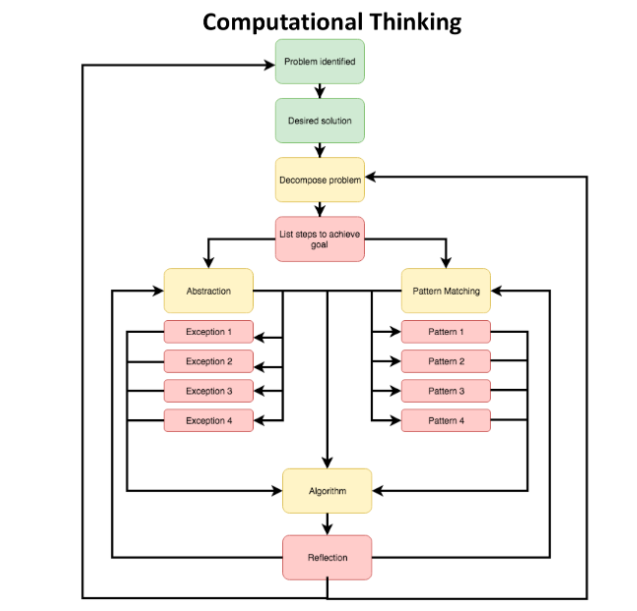
This type of computational thinking is cyclical, and allows students to identify a problem, list steps to achieve a goal in order to create an abstraction and identify a pattern to help create an algorithm before achieving an outcome which allows for personal reflection on what to do to make it better.
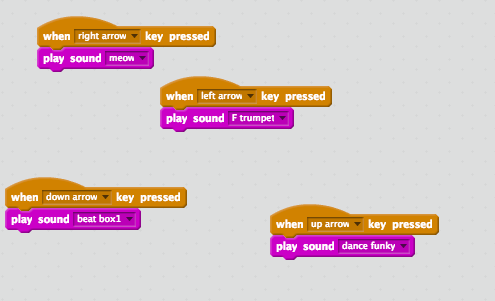 Using Makey Makey to create a musical instrument. (Remember: Someone must be holding “Earth” for it to work)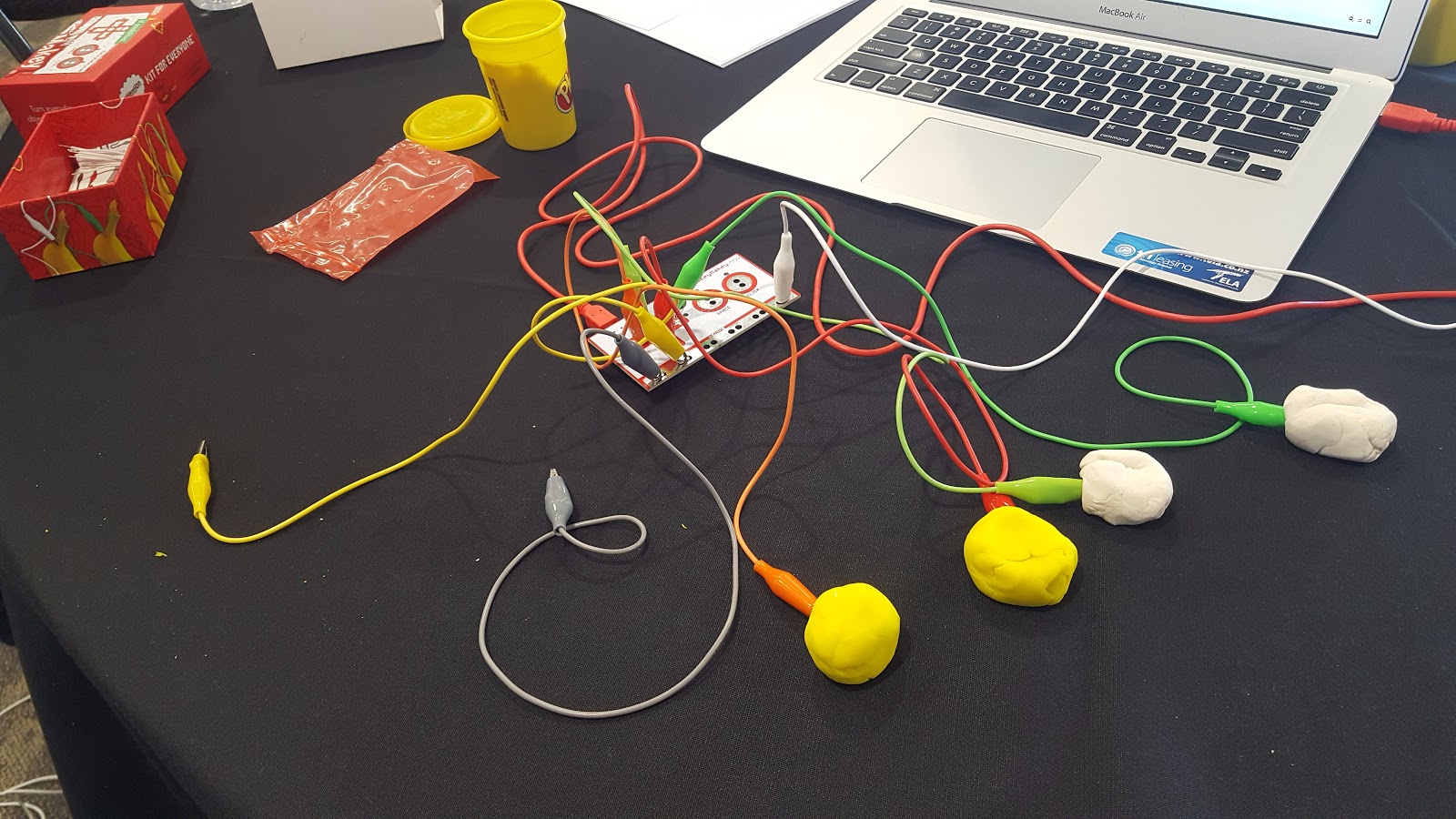
I am excited to see if we are able to use some Makey Makey kits this coming term for our Inquiry "Musical Madness" where are students will be creating their own music. It would be awesome to have them set up on 1-2 iMacs in our space for student exploration in a small group.
Subscribe to:
Posts (Atom)